Calm authenticates Privy users via Privy’s identity tokens —
short-lived JWTs that carry the user’s sub and linked_accounts
(including the wallet and email). They are not the same as Privy
access tokens. You only need to flip this once per Privy app.
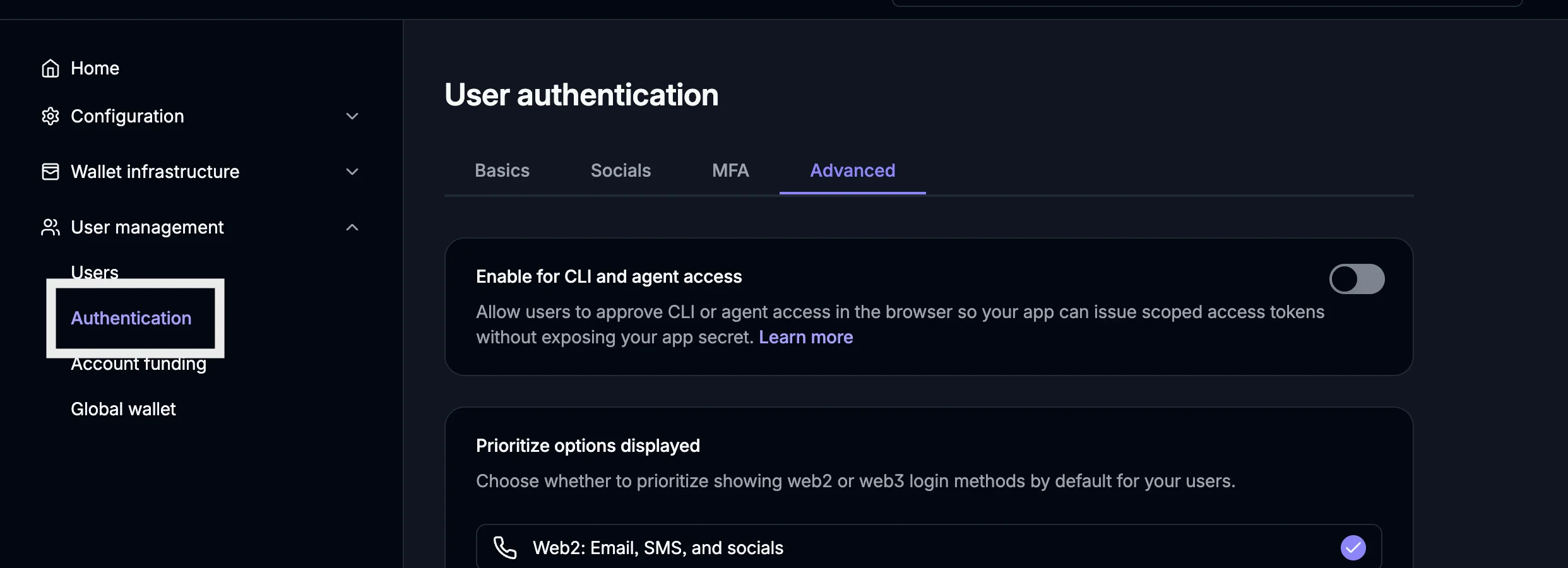
Navigate to User Management → Authentication → Advanced
Privy dashboard: User management → Authentication, Advanced tab
3
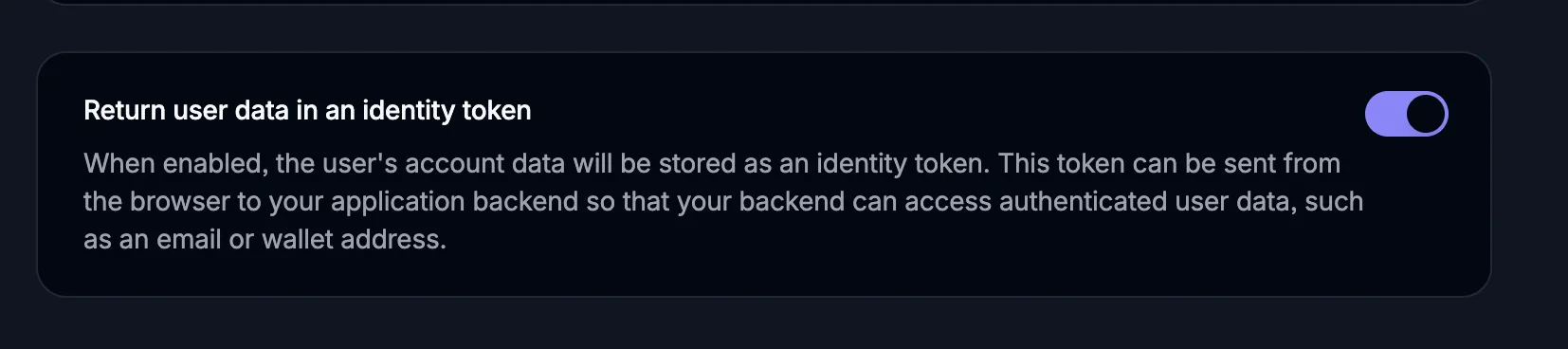
Toggle "Return user data in an identity token" ON
Scroll the Advanced tab until you see it. Once enabled, the user’s
linked_accounts (including the linked wallet) ride inside the
identity token — which is exactly what the SDK forwards to Calm.
"Return user data in an identity token" toggle, enabled
If this toggle is off, the SDK can’t start a session — the API can’t
see the user’s wallet in the JWT claims and returns
wallet_not_linked.
The calmKey you pass to <PrivyCalmProvider> is a publishable key
minted in the Calm dashboard. A Privy key is bound to your Privy app
ID, so Calm only accepts identity tokens minted by that Privy app.
1
Open the Calm dashboard
Sign in to the Calm dashboard and open
Publishable keys.
2
Fill out "Generate a new key"
Environment — Sandbox to start, Live for production. Each
environment issues its own key (calm_public_sandbox_… /
calm_public_live_…).
Wallet provider — select Privy.
Privy app ID — paste your Privy app ID (from the Privy
dashboard). Required for Privy keys; it binds the key to your Privy
app.
Allowed origin(optional) — the origin your app is served
from. Live keys require an https:// origin; in Sandbox you can
leave it blank to skip the Origin check (e.g. for
http://localhost).
Calm dashboard: Generate a new key, Privy selected
3
Generate and copy the key
Click Generate. The new key appears under Active keys — copy
it and pass it as calmKey. It looks like
calm_public_sandbox_<32 hex>.
Place <PrivyCalmProvider> inside <PrivyProvider> and
<QueryClientProvider>.
app/layout.tsx
"use client";import { PrivyProvider } from "@privy-io/react-auth";import { QueryClient, QueryClientProvider } from "@tanstack/react-query";import { PrivyCalmProvider } from "@calm-xyz/react/privy";const queryClient = new QueryClient();export default function RootLayout({ children,}: { children: React.ReactNode;}) { return ( <html lang="en"> <body> <PrivyProvider appId={process.env.NEXT_PUBLIC_PRIVY_APP_ID!}> <QueryClientProvider client={queryClient}> {/* <PrivyCalmProvider> must be wrapped in <PrivyProvider> and <QueryClientProvider> — it reads the identity token from Privy and uses react-query under the hood. */} <PrivyCalmProvider calmKey={process.env.NEXT_PUBLIC_CALM_KEY!} currency="usd" rpcUrls={{ 1: "https://your-ethereum-rpc", 8453: "https://your-base-rpc", 999: "https://rpc.hyperliquid.xyz/evm", }} > {children} </PrivyCalmProvider> </QueryClientProvider> </PrivyProvider> </body> </html> );}
Mount <PrivyCalmProvider> only once the signed-in user has a connected
wallet — it reads the wallet address at mount and requires it to be
defined. For email logins Privy provisions the embedded wallet as a
separate step after authentication, so authenticated can be true while
the wallet address is still undefined; mounting in that window throws.
Gate the mount on usePrivy().user?.wallet?.address.
The provider always renders its children. Wrap any trigger element in
<CalmOnramp> to open the deposit modal, and gate it on the Calm session
being ready via useSession — the trigger only
enables once the session is live, so the modal’s data loads immediately
on open. (A connected wallet alone isn’t enough; the session is what the
modal’s requests are authenticated with.)
Your publishable key — calm_public_(live|sandbox)_<32 hex>. Identifies
the Calm tenant. Sent to the API on every session creation via
the X-Calm-Publishable-Key header.
Per-chain RPC URLs (keyed by chain id) used to read transaction
receipts when confirming a swap. The receipt is read from the chain the
swap transaction lands on (e.g. Base 8453), so each source chain needs
a reliable RPC — reading through the wallet’s own endpoint can stall the
confirm step. Provide an entry for every chain you support. Pass a
stable (memoized) object.
The provider’s createSession throws on any non-2xx response. The
useSession hook surfaces the error in
result.error. See Errors for the full code table;
the most common from this shell:
error.code
Meaning
invalid_token
Privy identity token couldn’t be verified — token missing claims, signature invalid, or past exp. Check the Privy dashboard toggle above.
wallet_not_linked
The wallet on the session URL isn’t in the Privy user’s linked accounts. Usually means the identity-token toggle is off and the wallet didn’t ride inside the JWT.
invalid_publishable_key
calmKey is malformed, unknown, or revoked. Check your Calm dashboard.
publishable_key_missing
No X-Calm-Publishable-Key header reached the API — usually a bundler stripping the env var. Check process.env.NEXT_PUBLIC_CALM_KEY.
origin_not_allowed
Your page’s Origin isn’t on the publishable key’s allowlist. Live keys require HTTPS; add the origin in the dashboard.
refresh_invalid
The calm_refresh cookie is missing, expired, or bound to a different wallet (common after a Privy account switch). Call useSession({ address }).clear() and usePrivy().logout() before mounting for the new wallet.
.svg?fit=max&auto=format&n=dWcfLX8ihtBnx27z&q=85&s=063a44188d21b27136ad7d37c34ee2eb)